Client Notifications
Extension for Phox
Built for the Phox WHMCS Client Theme

Show the right notification to the right client in WHMCS

Create alerts, modals and floating alerts, then decide exactly where and to whom they show — by page, client, owned services and domains, or what’s in the cart.

Learn More

First year is $29, then $20 / year on every renewal.

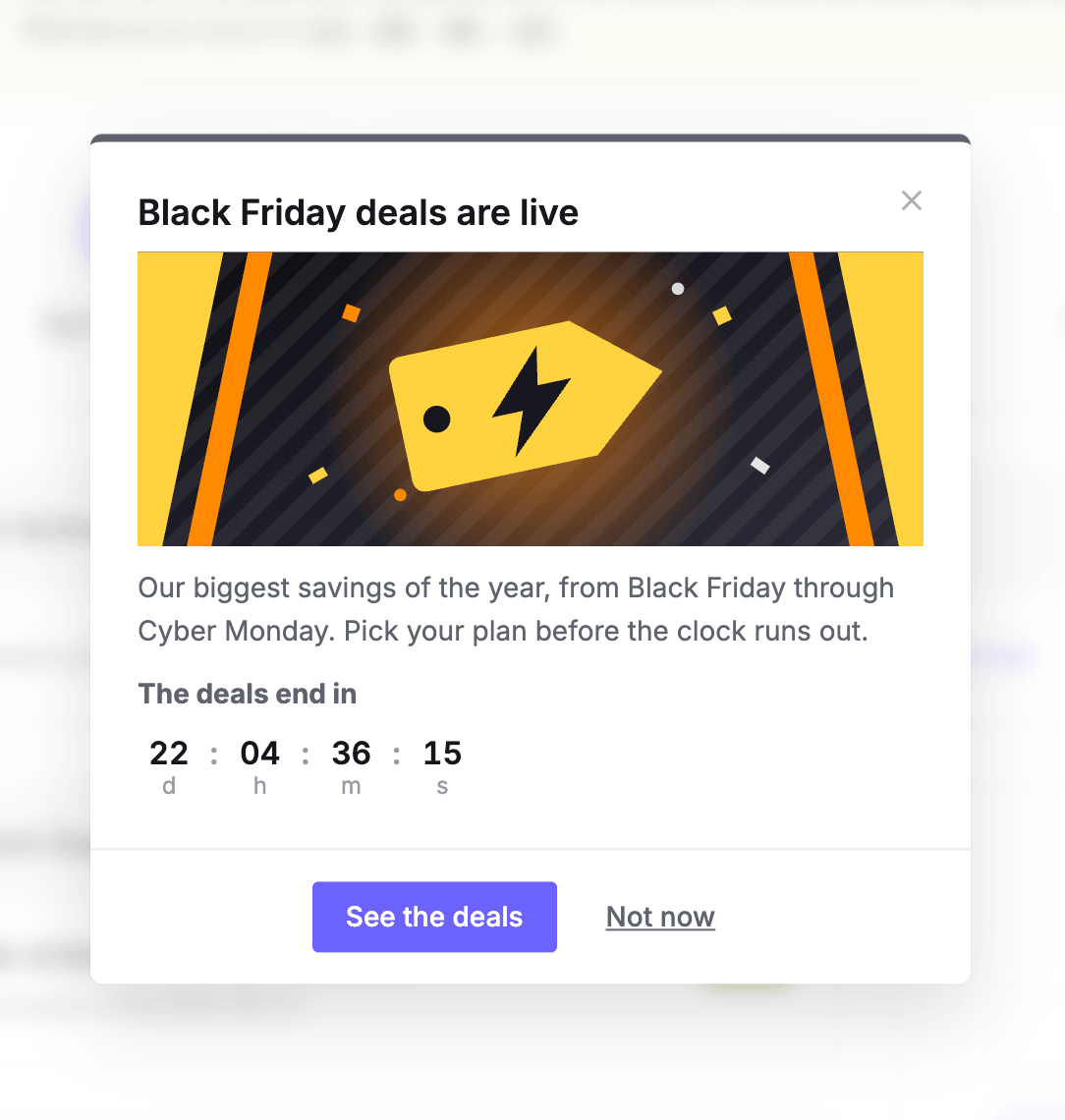
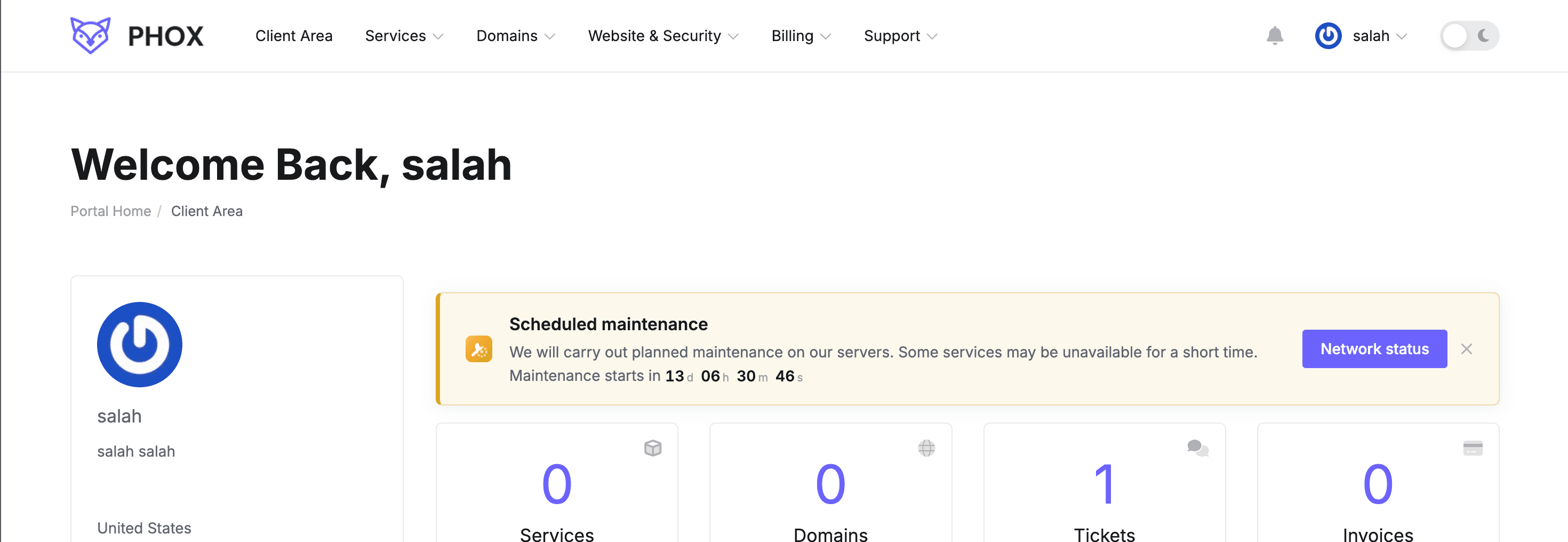
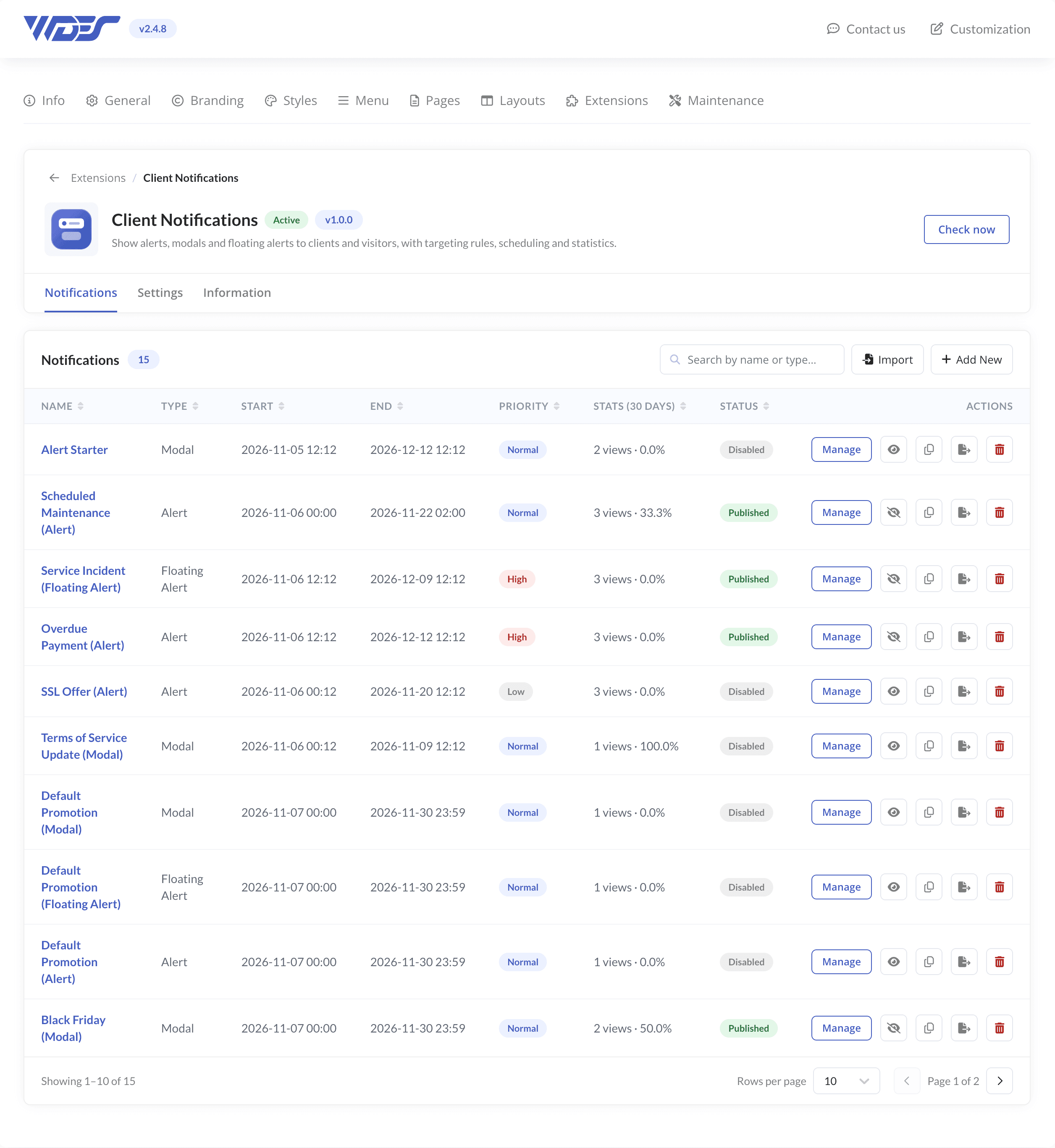
Black Friday modal with a countdown in the client areaScheduled maintenance alert on the client area home pageNotifications list in the WHMCS admin
Display Rules

Decide where and to whom it shows

Rules are grouped in cards you switch on or off. A notification shows when every card that is on matches — with every card off, it shows to everyone.

Page Filter

Show it on the pages that matter

Pick all pages, the client area or the order process, or exact pages: product groups, support departments or any custom URL. Excluded pages always win, so a notice never lands where it shouldn’t.

Client Filter

Target clients by status, group and country

Show a notification to guests, logged-in clients or both. Narrow it to selected clients, client groups, countries, marketing opt-ins or clients who signed up in the last few days.

Service Filter

Match the services a client owns

Filter by product, status, billing cycle, server, registration and due dates, and even configurable options. Set how many matching services a client needs before the notification shows.

Services Not Assigned

Skip clients who already own the product

Show a notification only to clients who own none of the selected services. Offer SSL, backups or an add-on without pitching it to clients who already bought it.

Domain Filter

Reach clients by their domains

Filter by TLD, status, registrar, billing cycle, expiry date or days until the due date. Remind clients about a domain renewal before it expires, with a coupon in the message.

Cart Filter

React to the visitor’s shopping cart

Read the current cart for guests and clients: number of items, amount per currency, products inside and whether a promo code is applied. Rescue an abandoned checkout with the right coupon.

Notification Types

Three ways to get noticed

Pick a type and a state — Info, Success, Warning, Danger and more. Colours come from your Phox settings, in light and dark mode.

Alert

Sits inside the page, under the title. Buttons on the right or at the bottom.

Learn More: Alert →

Modal

A pop-up that opens on page load, on exit intent or when a link is clicked.

Learn More: Modal →

Floating Alert

A bar fixed at the top of the window, above the menu, that pushes the page down.

Learn More: Floating Alert →
Admin Area

Easy to manage from WHMCS

Everything lives under Addons, in an editor that walks you through each notification and shows how it performs once it’s live.

Step-by-Step Editor

Build a notification in five steps — style, content, display rules, conditions and publish — then check the summary before it goes live.

14 Predefined Notifications

Import Black Friday, Scheduled Maintenance, Overdue Payment and more in one click, with English and Arabic content.

Media Manager

Pick Font Awesome icons or SVG illustrations that follow your Phox colours, or upload your own images.

Built-in Statistics

Views, closes, clicks per button and click rate for 7, 30 or 90 days, with a daily chart.

Content & Statistics

Write once, measure every click

A visual editor with a live preview, buttons, icons and images — plus the numbers to see which notification works. See all options

Content in Every Language

Write the title, message and buttons per language. Arabic and other right-to-left languages display right to left on their own.

Personal Variables

Greet clients by name and show their unpaid invoices, overdue count or credit balance. Guests get a fallback you choose.

Live Countdown Timer

Count down to the end of a sale or the start of maintenance, in four styles and three sizes, or reset it every 24 hours.

Close and Show Again

Decide whether clients can close a notification and when it comes back: next reload, next login, after some days or never.

Buttons That Lead Somewhere

Add buttons to any URL, a WHMCS page such as Invoices or Network Status, or one that closes the notification. Each has its own size, style and colour.

Priority and Page Limits

When several notifications match a page, priority decides the order. Cap how many modals and floating alerts show at once.

Use Cases

Ideas you can launch in minutes

A few of the ways hosting companies use Client Notifications. Many start from a predefined notification you import with one click. More recipes

Promotions

Seasonal sales

Import Black Friday or Christmas Sale with a countdown, set your dates and publish.

Upgrade to a higher plan

Show an upgrade button only to clients on your entry plan with an active service.

Cross-sell an add-on

Offer SSL or backups only to clients who don’t own that product yet.

Rescue an abandoned checkout

Show a coupon on order pages when the cart has items but no promo code applied.

Pages and Billing

Support department notice

Tell clients what to expect before they open a ticket in a selected department.

Product group alert

Announce a new offer or low stock on a product group page.

Overdue payment reminder

Show clients how many invoices are overdue, with a Pay now button.

Domain expiry reminder

Remind clients whose domains are due within 30 days, with a renewal coupon.

Maintenance and Information

Planned maintenance

Count down to the start and show it only to clients on the affected servers.

Live outage

Publish an incident notice with a Network Status link, then disable it when it’s fixed.

Terms of Service update

Ask logged-in clients to confirm they have read your updated terms.

Onboarding tips

Welcome new clients in their first two weeks and hide the tips once closed.

Pricing

One license, every feature

Use it on one WHMCS installation. Renew each year to keep updates and support — the installed extension keeps working either way.

All prices exclude VAT. VAT is added at checkout at the rate that applies in your country.

Instant downloadRequires PhoxSupport included
$20/ year

First year is $29 — every year after that renews at the $20 above.

Alerts, modals and floating alerts
Display rules, countdowns and statistics
Updates and support for one year
One WHMCS installation
Step-by-step docs for setup and updates
FAQ

Frequently Asked Questions

It lets you create any number of notifications in your WHMCS admin and show each one in the Phox client area as an alert, a modal or a floating alert.

Display rules decide where and to whom each one shows: by page, client, owned services and domains, or the visitor’s shopping cart.

Yes. Page, cart and client status rules work for guests too. Client, service and domain filters only match logged-in clients.

It’s your choice. Turn on the close icon and pick when it shows again: after a reload, at the next login, after a number of days or never. Leave it off to keep important messages visible.

No. All Phox extensions need Phox Client Theme installed and active on your WHMCS. They are not compatible with other WHMCS themes.

Phox Templates module 2.4.8 or later, WHMCS 9.0.9 or later and PHP 8.2 or later. Import and export need the PHP zip extension, which your host can enable.

Yes. Automatic renewal can be switched off for any Phox product, and no further renewal invoices will be generated.

Nothing breaks. Renewing gives you new versions and technical support for another year, but the extension keeps working even if the renewal invoice stays unpaid.

Yes. You are free to customize it to fit your project.

If the extension does not work on a supported Phox install, contact support within 14 days.

Need something tailored to your business?Get in touch and we’ll work out the details together.
Client NotificationsTargeted notifications for Phox
$20/yr$29 first year